User Roles & Permissions: Full Control with Peace of Mind

Not everyone on your team needs the same access. With Ticlick, you decide exactly who can view, edit, or manage data—from leads and payments to sensitive student documents. Clear for teams, safe for students.

From access sprawl to clear boundaries

In student recruitment, different people need different windows into the CRM. Sales tracks leads, visa officers handle documents, finance manages invoices, and external partners only need a narrow view of the students they support. When everyone can see everything, mistakes and data leaks become a real risk. When access is too tight, work slows down, and teams escalate simple requests all day.

Ticlick’s User Roles & Permissions gives you precise control without adding friction. You decide, at a granular level, who can view, create, edit, or delete in every module: Leads, Programs, Participants, Tasks, Accounting, Reminders, and Reports. Roles are easy to update as responsibilities change, and sensitive changes trigger admin alerts. Every action is logged, so you always have an audit trail.

Core Features of User Roles & Permissions

Create Unlimited User Accounts

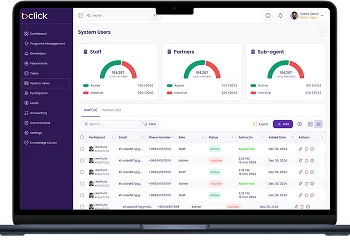
Growing teams shouldn’t mean losing control. With Ticlick, you can add as many users as you need—whether they’re counsellors, visa officers, finance staff, or external partners.

Each account is linked to a clear role from day one, and admins can monitor active users, track login history, and deactivate access instantly when someone leaves.
Define Custom Roles with Granular Permissions.

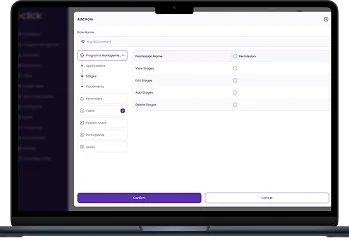
No two roles in your organization are the same. Ticlick lets you build roles that reflect real responsibilities, not generic presets. For every module—Leads, Programs, Participants, Tasks, Accounting, Reminders, and Reports—you decide whether a user can view, create, edit, or delete.

That means sales can update leads but never touch financials, while visa staff can review documents but not change program prices.

Flexible Role Management

Responsibilities change, and so should permissions. Admins can update any user’s role at any time, with changes taking effect instantly across the system.

Sensitive updates—like granting access to financial data—trigger admin alerts, so there are no silent risks.

Protect Student Data at Every Level.

Student trust depends on confidentiality. With Ticlick, sensitive Documents (passports, job offers, financial records) can be restricted from external users. Payment and invoice access is limited to finance staff. Accidental edits to program workflows are prevented by role-based locks.

Every action is logged for accountability, making audits and sponsor checks smoother.

Use Cases of User Roles & Permissions

Internal Teams with Different Responsibilities

In a single agency, sales, visa officers, and finance staff each have very different needs. With Ticlick, sales only access leads and program details, visa staff handle documents and stages, and finance manages invoices and reports. This keeps everyone focused while reducing the chance of mistakes.
                   

External Counsellors and University Partners

If you work with sub-agents or universities, you can grant them restricted access. They only see their assigned students, with optional read-only permissions. This builds trust with partners without exposing sensitive student or financial data.
                   

Seasonal and Temporary Staff

During peak seasons, agencies often bring in short-term staff. Ticlick allows you to give them time-limited or restricted access so they can support operations without ever seeing information they don’t need. When the season ends, their accounts can be disabled in one click.
                   

Auditors and Compliance Checks

Sometimes, you need external auditors or sponsors to review your data. Ticlick supports read-only roles with access to specific reports or participant data, ensuring transparency without compromising control.
                   

Case Study | Why User Roles & Permissions Make a Big Difference

Independent research highlights that instituting clear role-based access controls (RBAC) within educational systems leads to stronger data protection, fewer errors, and better team productivity:

  • Enhanced Data Security & Least Privilege

    The principle of least privilege (only giving users the minimum access they need) is widely accepted in security literature. It helps prevent unauthorized access to student records and sensitive financial data. Studies show RBAC systems reduce exposure to data breaches significantly.

  • Streamlined Permission Management

    When roles are well defined, adding or changing user permissions becomes much easier. Admins don’t need to manually adjust dozens or hundreds of user accounts; they just update the role, and everyone assigned that role updates automatically. This cuts down administration time and reduces configuration errors.

  • Improved Compliance & Auditability

    RBAC helps educational institutions comply with data protection laws and audit requests. Clear logs of who accessed what, when, and for what reason are part of best practices. Research shows that systems with role-based permissions have higher success rates in audits and fewer compliance issues.

  • Flexibility for Growth & Multiple Teams

    For institutions with multiple branches or external partners, restrictive roles allow local teams to manage their own students while central teams oversee all. This delegation improves speed and clarity. As seen in several case studies and guidelines from RBAC research, such setup supports scale without sacrificing security.

That’s exactly why with Ticlick’s User Roles & Permissions, we built the system so that every role—from sales to visa officers, external partners to seasonal staff—has just the access they need. Everything is logged, changes are easy, and sensitive data is always protected.

Core Features

Ticlick’s Accounting & Payments module is built to remove confusion from student finances and give both teams and students full transparency. Instead of chasing invoices and reconciling spreadsheets, all payments are linked directly to student profiles, programs, and stages—so everyone knows exactly what’s paid, what’s pending, and what’s next.

Flexible User Management

Define Custom Roles With Granular Permission

Create Unlimited User Accounts

Take Control of Access and Protect What Matters Most

From counselors to finance teams and external partners, Ticlick’s User Roles & Permissions ensure everyone sees exactly what they need — and nothing they don’t. Keep student data safe, reduce errors, and stay fully compliant while your team works faster and smarter.